In previous posts, I described how I set up my repurposed laptop server and Raspberry Pi server rack. Together, they have grown into a useful little homelab.
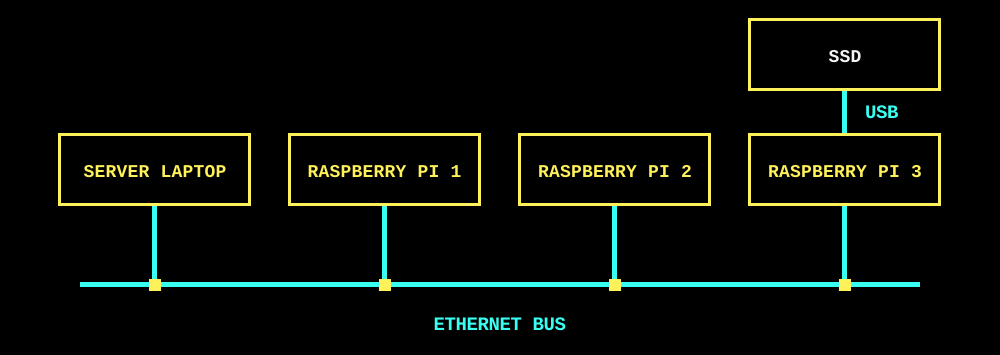
The top-level topology is simple, but the deployed services and their configuration complicate things quickly.
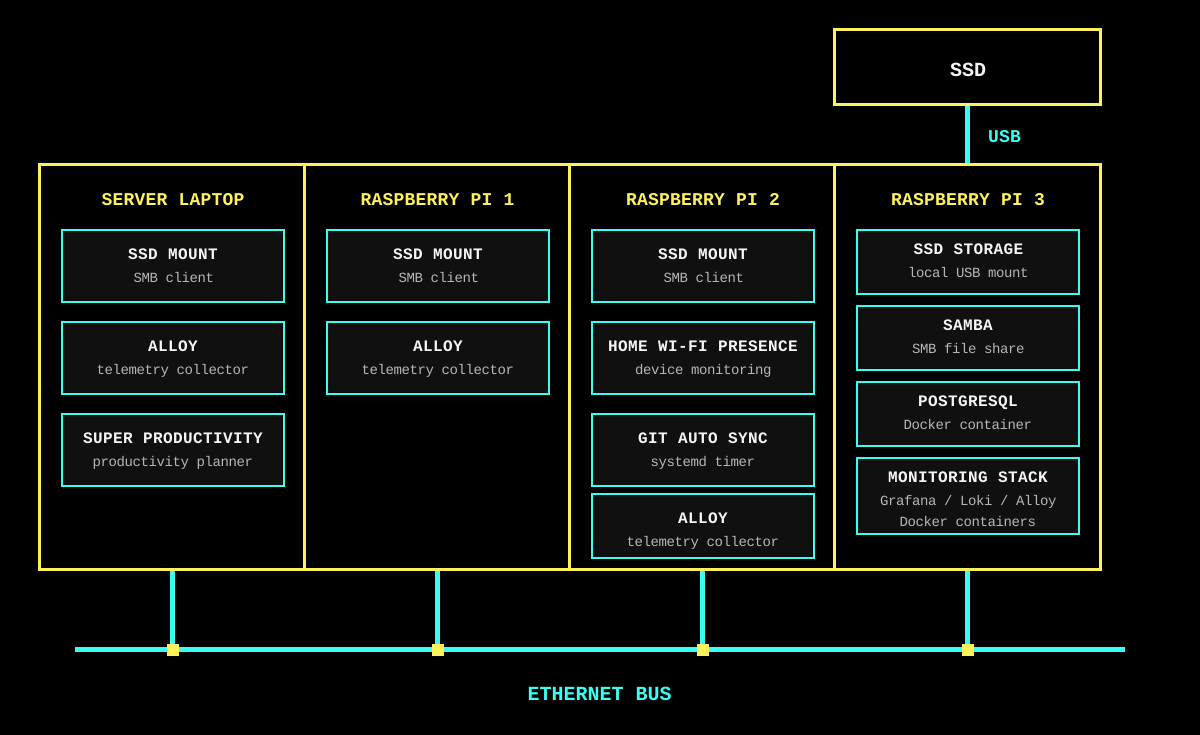
It can be tricky to keep track of:
- Which services are deployed to which machines.
- Which hosts are connected to which network drives.
- Configuration files spread across various machines.
- The commands to manage everything.
Because of all that, I decided to move my homelab configuration into an Ansible repository, with the aim of making each machine’s desired state visible, repeatable, and easier to modify or recover.
Setting Up the Ansible Inventory
I began by configuring an inventory so that Ansible knows what machines are available in my deployment.
all:
  children:
    homelab:
      hosts:
        server-laptop:
          ansible_host: "mrchazaaa-asus-laptop"
          ansible_user: "mrchazaaa"
      children:
        raspberry_pis:
    raspberry_pis:
      hosts:
        raspberrypi1:
          ansible_user: "pi"
        raspberrypi2:
          ansible_user: "pi"
        raspberrypi3:
          ansible_user: "pi"
The inventory also defines service groups for target deployments. Adding a host to postgres, monitoring, device_monitoring, git_auto_sync, samba, or samba_clients results in that service being deployed to that machine:
    postgres:
      hosts:
        raspberrypi3:
    monitoring:
      hosts:
        raspberrypi3:
    docker_hosts:
      hosts:
        raspberrypi3:
    device_monitoring:
      hosts:
        raspberrypi2:
    git_auto_sync:
      hosts:
        raspberrypi2:
    samba:
      hosts:
        raspberrypi3:
    # Pi 3 serves PiSSD locally; every
    # other homelab machine mounts it
    # over SMB.
    samba_clients:
      hosts:
        raspberrypi1:
        raspberrypi2:
        server-laptop:
As such, a general purpose PostgreSQL DB and Grafana observability containers are deployed to Pi 3, while device monitoring is run on Pi 2.
Host and service variables are then resolved for configuration specific to machines or service configuration. This keeps the playbooks reusable while leaving details such as addresses, mount points, and service settings close to the host or group they belong to.
Ansible Vault
Some configuration still needs to remain private, particularly deployment passwords. I keep those values in an encrypted Ansible Vault, which means the encrypted file can live alongside the playbooks in Git (the vault password itself remains private). This allows me to avoid repetitively typing in passwords during playbook runs while staying secure.
ansible_password: "{{ vault_homelab_password }}"
ansible_become_password: "{{ vault_homelab_password }}"
Deploying docker containers
One of the key services managed by my Ansible setup is a collection of Docker Compose stacks, including my Grafana observability stack. For this, each service playbook simply depends upon a corresponding Compose file. The Compose files stay static, but Ansible injects inventory and Vault variables via templated .env files before deployment.
One such service is the PostgreSQL database that acts as a storage layer for various applications. Automating deployments of this database required some care. I intended for its data to persist between deployments and I had to make sure that a playbook run could not accidentally replace existing data with an empty database. To do this I added guards which refuse to start PostgreSQL unless the expected data directory and major version are already present. As well as this, the playbook never uses a volume-deleting Compose command.
- name: Refuse to initialize or upgrade PostgreSQL storage
  ansible.builtin.assert:
    that:
      - postgres_data_directory.stat.exists
      - postgres_data_directory.stat.isdir
      - postgres_version_file.stat.exists
      - (postgres_version.content | b64decode | trim) == postgres_expected_major
I prefer this to an implicit first-run initialisation: a failed deployment is much easier to investigate than a successful deployment pointing at a new, empty database.
Deploying systemd services
Not every service belongs in a container. For example, my device monitoring project needs direct access to the LAN, so Ansible deploys it as a systemd service. Its playbook installs the unit file, enables it, and ensures it is running. Then a handler is setup to restart the service if any changes to the deployed version or configuration are detected.
- name: Enable Device Monitoring
  ansible.builtin.systemd_service:
    name: "{{ device_monitoring_service }}.service"
    enabled: true
    state: started
    daemon_reload: true
Alongside that service, Git Auto Sync is deployed to regularly pull updates from the device monitoring repo. This timer is also managed by Ansible as a systemd service with intentionally narrow permissions: it can update the device-monitoring checkout and restart only its target systemd service, but it doesn’t gain unrestricted administrator access.
Reflection
Overall, this setup gives my homelab a clearer deployment layout, repeatable configuration, and a safer path for routine changes and recovery. The same command-line workflow also makes it practical to use AI agents for small, reviewable infrastructure changes, which has made routine maintenance faster.